
前言
本文是基于 Github Fuzzing-Module↗ 的 Fuzzing 学习笔记。如有不准确的地方,万望大佬们斧正。
Exercise 1
首先,我们获取得到如下源码:
#include <iostream>#include <stdio.h>#include <stdlib.h>#include <string.h>
using namespace std;
int main() {   string str;
   cout << "enter input string: ";   getline(cin, str);   cout << str << endl << str [0] << endl;
    if(str[0] == 0 || str[str.length() - 1] == 0) {        abort();    }    else {        int count = 0;        char prev_num = 'x';        while (count != str.length() - 1) {            char c = str[count];            if(c >= 48 && c <= 57) {                if(c == prev_num + 1) {                    abort();                }                prev_num = c;            }            count++;        }    }
    return 0;}
通过代码审计我们很容易发现存在 3 个崩溃点 (Crash Point)。接下来我们将用 afl++ 来发现这 3 种崩溃点。
我们需要创建 build 文件夹用于存放编译好的可执行二进制文件。此外,我们需要创建 seeds 目录和 out 目录。
通过审计代码可以知道程序利用 stdin 标准输入流进入读入。因此我们需要选用 AFL++ 的 stdin 模型。因为本程序逻辑简单,我个人感觉没有啥很好的结构化 seed。所以我们直接使用 for i in {0..4}; do dd if=/dev/urandom of=seed_$i bs=64 count=10; done 创建 5 个随机 seed。
因为是有源码的,所以我们可以利用 afl-clang-fast++/afl-g++-fast 来快速编译 .cpp 文件。
我们稍微对比一下 afl-clang-fast++/afl-g++-fast。
| 维度 | afl-clang-fast++ | afl-g++-fast |
|---|---|---|
| 编译器后端 | LLVM / Clang | GCC |
| 插桩方式 | LLVM IR 级插桩 | GCC 插件 |
| 插桩精度 | 高(边覆盖) | 中(基本块) |
| 执行速度 | ⭐⭐⭐⭐⭐ | ⭐⭐⭐ |
| 稳定性 | 高 | 中 |
| CMPLOG / RedQueen | 完整支持 | ❌(几乎不可用) |
| Sanitizer 兼容 | 极好 | 有限 |
| 维护状态 | 主力路线 | 兼容路线 |
LLVM 插桩可以:
- 捕获比较操作
- 反推输入
- 快速命中深层逻辑
基于上述情况,afl-clang-fast++ 几乎是主力和首选。但是因为 clang 本身的限制,导致在部分场景中必须使用 gcc/g++,例如编译内核,特殊的 ABI (clang 不支持编译),强制使用 gcc 编译的。
回到本道练习题,我们自然首选 afl-clang-fast++。
afl-clang-fast++ \ -O0 -g \ -fsanitize=address,undefined \ ./simple_crash.cpp \ -o build/simple_crash随后使用如下指令开始 fuzz。
注意设置
echo core | sudo tee /proc/sys/kernel/core_pattern。
afl-fuzz \ -i ./seeds \ -o ./out \ -- .build/simple_crash等待几分钟后使用 Ctrl+c 退出 fuzz。然后,我本人得到了如下的 fuzz 结果。
➜ exercise1 git:(main) ✗ xxd out/default/crashes/id:000000,sig:06,src:000003,time:297,execs:183,op:int16,pos:2,val:+000000000: b6c4 0000 ....➜ exercise1 git:(main) ✗ xxd out/default/crashes/id:000001,sig:06,src:000003,time:413,execs:254,op:havoc,rep:200000000: 00c4 8711 ....➜ exercise1 git:(main) ✗ xxd out/default/crashes/id:000002,sig:06,src:000003,time:1512,execs:909,op:havoc,rep:200000000: a831 b129 eecd 22c8 d00f 8771 6ae1 7897 .1.).."....qj.x.00000010: 9ecc 3203 1f5e 2e51 caf8 d617 c48d 6173 ..2..^.Q......as00000020: c40a 11可以看到 3 种崩溃点都已经成功捕获了。
Exercise 2
第 2 道训练题发生了些许变化。相较于第 1 道训练题,本题给出了 3 个文件:airplane_object.cpp,airplane_object.hpp,main.cpp。
这里我们就需要继续了解一下 AFL++ 提供的编译链接工具了。这次我们需要比较 afl-clang-fast++ 和 afl-clang-lto++。
| 维度 | afl-clang-fast++ | afl-clang-lto++ |
|---|---|---|
| 插桩阶段 | 编译期(per Translation Unit) | 链接期(Whole Program IR) |
| 插桩机制 | LLVM IR pass(逐 TU) | LLVM LTO pass(全程序) |
| 覆盖率模型 | 基本块 / 边(hash) | 精确边级覆盖(edge-accurate) |
| 覆盖率质量 | 高 | 更高(更少 hash 冲突) |
| 路径判别能力 | 中–高 | 高 |
| 新路径“假阳性” | 较多 | 显著更少 |
| 执行速度 | 快 | 更快(≈ +5–15%) |
| 构建复杂度 | 低 | 高 |
| 编译稳定性 | 非常稳定 | 对构建系统更敏感 |
| 支持的优化级别 | -O0 / -O1 / -O2 | 强烈推荐 -O2/+ |
与 -O0 兼容性 | 完全兼容 | ⚠️ 技术可行,但价值极低 |
| 与 ASAN 兼容性 | 最佳实践组合 | 可用,但慢 |
| 与 UBSAN 兼容性 | 可用 | 可用 |
| 与 CMPLOG 组合 | 作为主 fuzz 或 cmplog | 推荐作为主 fuzz |
| 支持 Persistent Mode | 是 | 是 |
| 对 inline / template 感知 | 有限 | 完整(全局视角) |
| 适合项目规模 | 小 / 中 | 中 / 大 |
| 适合 fuzz 阶段 | 初期 / 调试 | 长期深度 fuzz |
| Crash 可调试性 | 极高(-O0 + -g) | 中等(优化影响栈) |
| 工程可维护性 | 高 | 中 |
| 推荐学习成本 | 低 | 中–高 |
| 典型用途 | 教学、PoC、漏洞定位 | 高质量覆盖、长时间跑 fuzz |
这里感觉 fast 和 lto 都可以胜任。但 lto 可以在全程序视角进行插桩,因此多 .cpp 编译我觉得还是 lto 会更有优势一点。
接下来我们编写一个 Makefile 来经行程序编译。
# ============================================================# Common settings# ============================================================
SRCS := $(wildcard *.cpp)TARGET := airplane
CXXFLAGS_COMMON := -std=c++17 -WallINCLUDES :=
# ============================================================# FAST build (afl-clang-fast++, ASAN/UBSAN, -O0)# ============================================================
FAST_DIR := build/fastFAST_CXX := afl-clang-fast++FAST_CXXFLAGS := $(CXXFLAGS_COMMON) -O0 -gFAST_OBJS := $(SRCS:%.cpp=$(FAST_DIR)/%.o)FAST_BIN := $(FAST_DIR)/$(TARGET)
# ============================================================# LTO build (afl-clang-lto++, -O2, no sanitizer)# ============================================================
LTO_DIR := build/ltoLTO_CXX := afl-clang-lto++LTO_CXXFLAGS := $(CXXFLAGS_COMMON) -O2 -gLTO_OBJS := $(SRCS:%.cpp=$(LTO_DIR)/%.o)LTO_BIN := $(LTO_DIR)/$(TARGET)
# ============================================================# DEBUG build (plain clang++, gdb-friendly)# ============================================================
DEBUG_DIR := build/debugDEBUG_CXX := clang++-18DEBUG_CXXFLAGS := $(CXXFLAGS_COMMON) -O0 -gDEBUG_OBJS := $(SRCS:%.cpp=$(DEBUG_DIR)/%.o)DEBUG_BIN := $(DEBUG_DIR)/$(TARGET)
# ============================================================# Phony targets# ============================================================
.PHONY: all fast lto debug clean
all: fast
# ---------------- FAST ----------------
fast: $(FAST_BIN)
$(FAST_BIN): $(FAST_OBJS)  $(FAST_CXX) $^ -o $@
$(FAST_DIR)/%.o: %.cpp  @mkdir -p $(FAST_DIR)  $(FAST_CXX) $(FAST_CXXFLAGS) $(INCLUDES) -c $< -o $@
# ---------------- LTO ----------------
lto: $(LTO_BIN)
$(LTO_BIN): $(LTO_OBJS)  $(LTO_CXX) $^ -o $@
$(LTO_DIR)/%.o: %.cpp  @mkdir -p $(LTO_DIR)  $(LTO_CXX) $(LTO_CXXFLAGS) $(INCLUDES) -c $< -o $@
# ---------------- DEBUG ----------------
debug: $(DEBUG_BIN)
$(DEBUG_BIN): $(DEBUG_OBJS)  $(DEBUG_CXX) $^ -o $@
$(DEBUG_DIR)/%.o: %.cpp  @mkdir -p $(DEBUG_DIR)  $(DEBUG_CXX) $(DEBUG_CXXFLAGS) $(INCLUDES) -c $< -o $@
# ---------------- CLEAN ----------------
clean:  rm -rf build
使用 AFL++ 官方推荐的做法,使用环境变量控制编译、运行行为。也可以手动在编译和链接时期都加入 -fsanitize=address,undefined。如果采用后者注意取消环境变量。
export AFL_USE_ASAN=1export AFL_USE_UBSAN=1export ASAN_OPTIONS=detect_leaks=0:abort_on_error=1export UBSAN_OPTIONS=abort_on_error=1通过审计我们不难发现程序还是使用 stdin 进行读入。但是这里明显是一种菜单类的问题。所以我并不像使用随机化 seeds 来完成这道 fuzz 训练。
通过代码审计我们知道合法的操作存在 h、f、l、t、q。我们不是很关心 q 操作带来的终止效果。因此们可以给出一些简短的 seeds。
echo '' > seed_emptyecho 'h' > seed_hecho 'f' > seed_fecho 'l' > seed_lecho 't' > seed_techo 'hh' > seed_hhecho 'hf' > seed_hfecho 'ht' > seed_htecho 'hl' > seed_hlecho 'ff' > seed_ff# 下面是一个 crash point 可以试试加不加入该 seed 对 fuzz 带来的影响# echo 'fftl' > seed_fftl注意设置
echo core | sudo tee /proc/sys/kernel/core_pattern。 在使用 LTO 的过程中,一般使用如下环境变量设置:
unset ASAN_OPTIONSunset AFL_USE_ASANunset AFL_USE_UBSANexport AFL_USE_LTO=1如果需要使用 ASAN fuzz,请设置如下环境变量:export ASAN_OPTIONS=detect_leaks=0:abort_on_error=1:symbolize=0
在都 fuzz 10 分钟的情况下,加入 fftl 的结果基本上是以 fftl 做变形触发的崩溃点,这样的崩溃点发现了 8 个。相反在不加入的情况下,只保存了 6 个用例。虽然后者的崩溃点本质上也是基于 fftl 但明显没有前者短小精悍。但我本人对这方面经验较浅,不好评价好坏。其次,在实战中我觉得已知崩溃点的去 fuzz 的概率小,反而是后者不知道崩溃点去 fuzz 的概率大。
下面陈列了不加入
fflt的 fuzz 结果。
(workenv) ➜ exercise2 git:(main) ✗ xxd out/default/crashes/id:000000,sig:06,src:000000,time:51827,execs:6481,op:havoc,rep:1500000000: d5ff 19d6 bcd6 d5ff 1959 916c 0002 6355 .........Y.l..cU00000010: ad00 6601 0066 6359 91a7 a7a7 a7a7 a7a7 ..f..fcY........00000020: a7a8 a6a7 a7a7 a7a7 c600 b3a7 a7a7 a7f7 ................00000030: ffa7 a7a7 c6ce 6ca7 ......l.(workenv) ➜ exercise2 git:(main) ✗ xxd out/default/crashes/id:000001,sig:06,src:000000,time:63109,execs:7533,op:havoc,rep:1500000000: 7474 7400 0274 74f8 f8f8 f8f8 0002 7466 ttt..tt.......tf00000010: 0100 6648 8574 926c 8574 9274 05c1 7466 ..fH.t.l.t.t..tf00000020: 0100 6648 8574 d274 f5c0 7400 0174 7474 ..fH.t.t..t..ttt00000030: 7474 8574 7474 802b 05c1 7466 0100 6648 tt.ttt.+..tf..fH00000040: 8574 d274 05c1 feca 05c1 7474 8574 7474 .t.t......tt.ttt00000050: 802b .+(workenv) ➜ exercise2 git:(main) ✗ xxd out/default/crashes/id:000002,sig:06,src:000000,time:100066,execs:11585,op:havoc,rep:900000000: d6d5 55b9 0064 0000 0040 6666 6674 7475 ..U..d...@fffttu00000010: e3ff ffff d6d5 55d6 d555 cee2 4949 4949 ......U..U..IIII00000020: ce68 486c 6c6c 6c6c 64 .hHllllld(workenv) ➜ exercise2 git:(main) ✗ xxd out/default/crashes/id:000003,sig:06,src:000000,time:106888,execs:12531,op:havoc,rep:900000000: 061f f815 f8f8 ffff 66ca 05c1 74ff 0156 ........f...t..V00000010: 9574 fa13 fd00 666d b1a7 806c .t....fm...l(workenv) ➜ exercise2 git:(main) ✗ xxd out/default/crashes/id:000004,sig:06,src:000000,time:203368,execs:21308,op:havoc,rep:500000000: 6666 6c6c 596c 6c6c 95fe cada c100 0000 ffllYlll........00000010: 0000 666c 6c59 6c6c 6c95 e4ca 05c1 0000 ..fllYlll.......00000020: 0066 0afe ca05 c1 .f.....(workenv) ➜ exercise2 git:(main) ✗ xxd out/default/crashes/id:000005,sig:06,src:000000,time:224150,execs:23301,op:havoc,rep:1400000000: 6c66 9574 0513 fd00 6c95 feca 05c1 0000 lf.t....l.......00000010: 1f66 0000 666c 6c59 6c6c 6c74 9574 0513 .f..fllYlllt.t..00000020: e905 c168 d46c d6d5 55c4 a8a8 a8a8 a8a8 ...h.l..U.......00000030: a8a8 a8a8 ....Exercise 3
本道练习题与 Exercise 2 又有所不同。从开发角度上来说,本题的源码的复杂度明显高于上一题(本题是一个简单的无人机项目)。因为题目已经给出了 cmake.txt 我们利用如下语句生成 Makefile 和 compile_commands.json 。
mkdir buildcd buildCC=afl-clang-lto CXX=afl-clang-lto++ cmake -DCMAKE_EXPORT_COMPILE_COMMANDS=1 ..可以参考 fuzzing newbie guide↗ 创建新 Source Trail 项目,以方便参考项目源码。
因为 Sourcetrail 很早就停止维护了。所以你可以使用 PeterMost↗ 维护的版本。或者使用 openGrok 作为阅读工具。
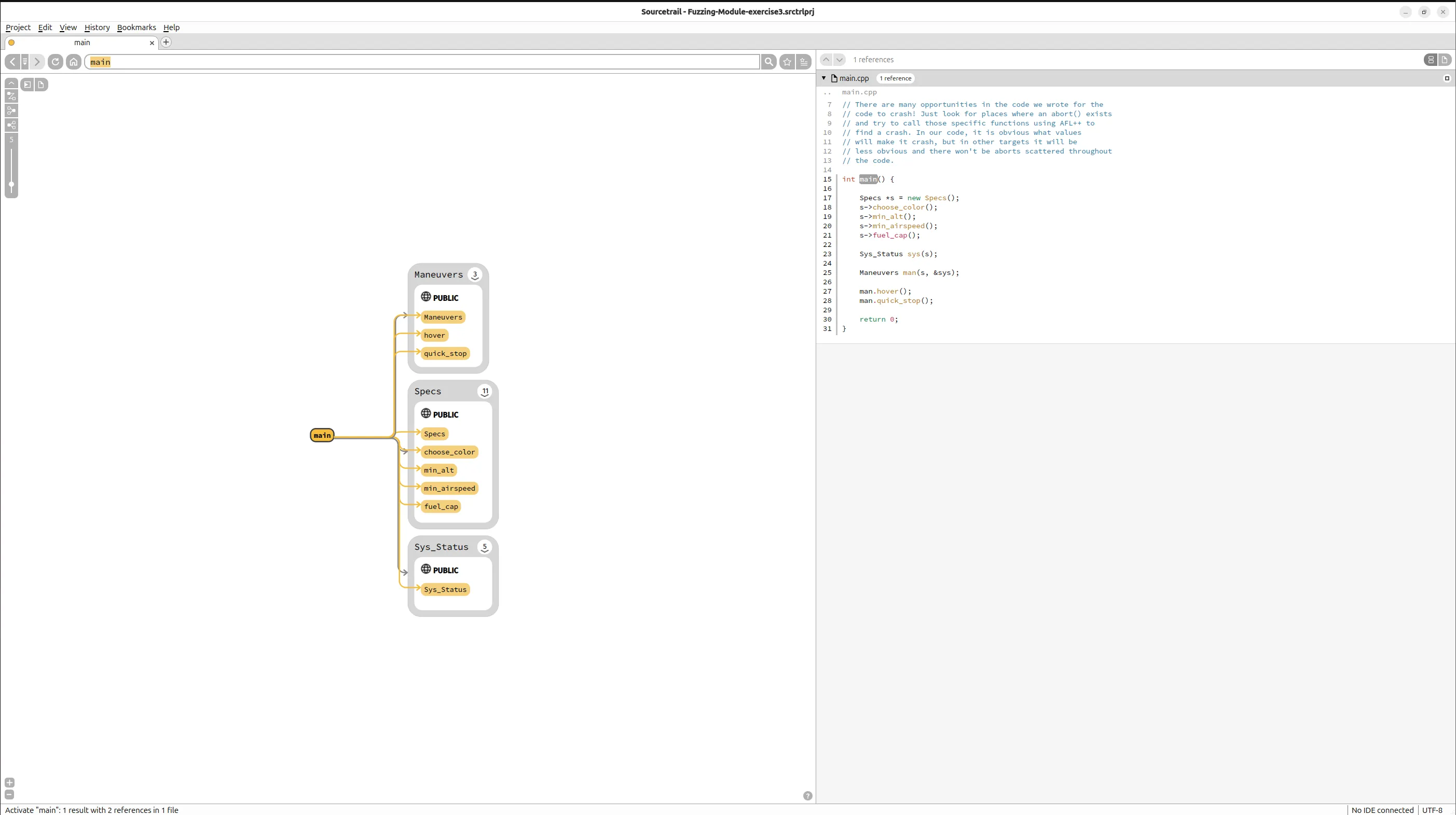
本题的核心在于 Slice Fuzzing。至于为什么需要 Slice Fuzzing,可以参看 Fuzzing Program Slices↗,这里不进行过多赘述。
我从 Github 仓库给出的 specs-slice.cpp 入手了解如何利用 afl++ 进行 Slice Fuzzing。
int main(int argc, char** argv) {    // In order to call any functions in the Specs class, a Specs    // object is necessary. This is using one of the constructors    // found in the Specs class.    Specs spec(505, 110, 50);    // By looking at all the code in our project, this is all the    // necessary setup required. Most projects will have much more    // that is needed to be done in order to properly setup objects.
    // This section should be in your code that you write after all the    // necessary setup is done. It allows AFL++ to start from here in    // your main() to save time and just throw new input at the target.    #ifdef __AFL_HAVE_MANUAL_CONTROL        __AFL_INIT();    #endif
    spec.choose_color();    //spec.min_alt();
    return 0;}
代码逻辑很简单。因为 spec.choose_color() 需要依赖 Specs 类实例,因此 Specs spec(505, 110, 50) 是必要的。 而下述片段把 afl++ 的 fuzzing 起点精确切到“逻辑敏感代码之前”,避免每轮输入都重复昂贵的初始化路径。
#ifdef __AFL_HAVE_MANUAL_CONTROL __AFL_INIT();#endif这里我们简单的做一个扩展。假设 spec.choose_color() 的行为与具体的 Specs 类实例关联。换言之,Specs spec(505, 110, 50) 需要纳入 Fuzz 区我们该怎么办?
比较推荐的方案是单次执行 + 人工控制。
#include <stdint.h>#include <stdlib.h>
int main(int argc, char** argv) {
#ifdef __AFL_HAVE_MANUAL_CONTROL    __AFL_INIT();#endif
    // === 1. 读取 fuzz input ===    uint32_t a = 0, b = 0, c = 0;
    if (read(0, &a, sizeof(a)) != sizeof(a)) return 0;    if (read(0, &b, sizeof(b)) != sizeof(b)) return 0;    if (read(0, &c, sizeof(c)) != sizeof(c)) return 0;
    // === 2. 轻度约束(工程必要) ===    a %= 1000;    b %= 500;    c %= 200;
    // === 3. fuzz 驱动的构造 ===    Specs spec(a, b, c);
    // === 4. fuzz 目标逻辑 ===    spec.choose_color();
    return 0;}
下面是上述方案的正确性简要说明。
| 点 | 原因 |
|---|---|
| forkserver 提前启动 | 构造路径可学习 |
| 每次 exec 都新对象 | 状态安全 |
| 构造 + 逻辑都在 slice 内 | 覆盖完整 |
如果你想要引入 Persistent Mode。那么在 Specs 支持完全 reset、构造析构无泄漏、fuzz 吞吐是瓶颈的情况下,可以采用如下方案。
#include <stdint.h>#include <unistd.h>
int main() {
#ifdef __AFL_HAVE_MANUAL_CONTROL    __AFL_INIT();#endif
    while (__AFL_LOOP(1000)) {
        uint32_t a, b, c;        if (read(0, &a, sizeof(a)) != sizeof(a)) break;        if (read(0, &b, sizeof(b)) != sizeof(b)) break;        if (read(0, &c, sizeof(c)) != sizeof(c)) break;
        a %= 1000;        b %= 500;        c %= 200;
        Specs spec(a, b, c);        spec.choose_color();    }
    return 0;}
如果 Specs 内部:使用全局状态;使用 static cache;注册 signal / thread / fd。persistent mode 会引入假 crash。这种情况下,退回方案一。
此外还存在一种关键技巧:结构性输入。其使用场景如下:
- Specs 参数语义强。
- 简单
read()难以触达深路径。 - 你想做 value profiling。
struct FuzzInput {    uint16_t alt;    uint16_t speed;    uint8_t  fuel;};
int main() {
#ifdef __AFL_HAVE_MANUAL_CONTROL    __AFL_INIT();#endif
    FuzzInput in;    if (read(0, &in, sizeof(in)) != sizeof(in)) return 0;
    in.width  %= 2000;    in.height %= 2000;    in.mode   %= 4;
    Specs spec(in.alt, in.fuel, in.speed);    spec.choose_color();
    return 0;}
如下是我们的 Fuzz 结果:
➜ exercise3 git:(main) ✗ xxd out/default/crashes/id:000001,sig:06,src:000004,time:6,execs:75,op:havoc,rep:300000000: 0a .➜ exercise3 git:(main) ✗ xxd out/default/crashes/id:000002,sig:06,src:000004,time:16,execs:107,op:havoc,rep:700000000: 3636 0af5 f6ff ff01 00e9 00 66.........➜ exercise3 git:(main) ✗ xxd out/default/crashes/id:000003,sig:06,src:000004,time:297,execs:1382,op:havoc,rep:1500000000: 3030 3030 3030 3030 3030 3030 3030 3030 0000000000000000➜ exercise3 git:(main) ✗ xxd out/default/crashes/id:000000,sig:06,src:000004,time:3,execs:62,op:havoc,rep:300000000: 310a 1.如法炮制,我们还能再测试 min_alt。
int main(int argc, char** argv) {    // In order to call any functions in the Specs class, a Specs    // object is necessary. This is using one of the constructors    // found in the Specs class.    Specs spec(505, 110, 50);    // By looking at all the code in our project, this is all the    // necessary setup required. Most projects will have much more    // that is needed to be done in order to properly setup objects.
    // This section should be in your code that you write after all the    // necessary setup is done. It allows AFL++ to start from here in    // your main() to save time and just throw new input at the target.    #ifdef __AFL_HAVE_MANUAL_CONTROL        __AFL_INIT();    #endif
    // spec.choose_color();    spec.min_alt();
    return 0;}
fuzz 结果:
➜ exercise3 git:(main) ✗ xxd out/default/crashes/id:000000,sig:06,src:000000,time:4,execs:63,op:havoc,rep:900000000: 2d32 f5ff ffff 3134 3734 3833 eded eded -2....147483....00000010: ed36 .6